I’m a lazy compositor and I don’t like keyframes.
If a bunch of keyframes and I were at a bus stop waiting for the same bus, when it arrives, I’d let them go on and wait for the next one.
Unfortunately, we ended on the same bus while working on the The Mandalorian. On that show, there were lot of blasters being fired, and they had to be animated frame by frame to match a target look.
We achieved this by using a master controller to tweak each parameter of the blaster template.
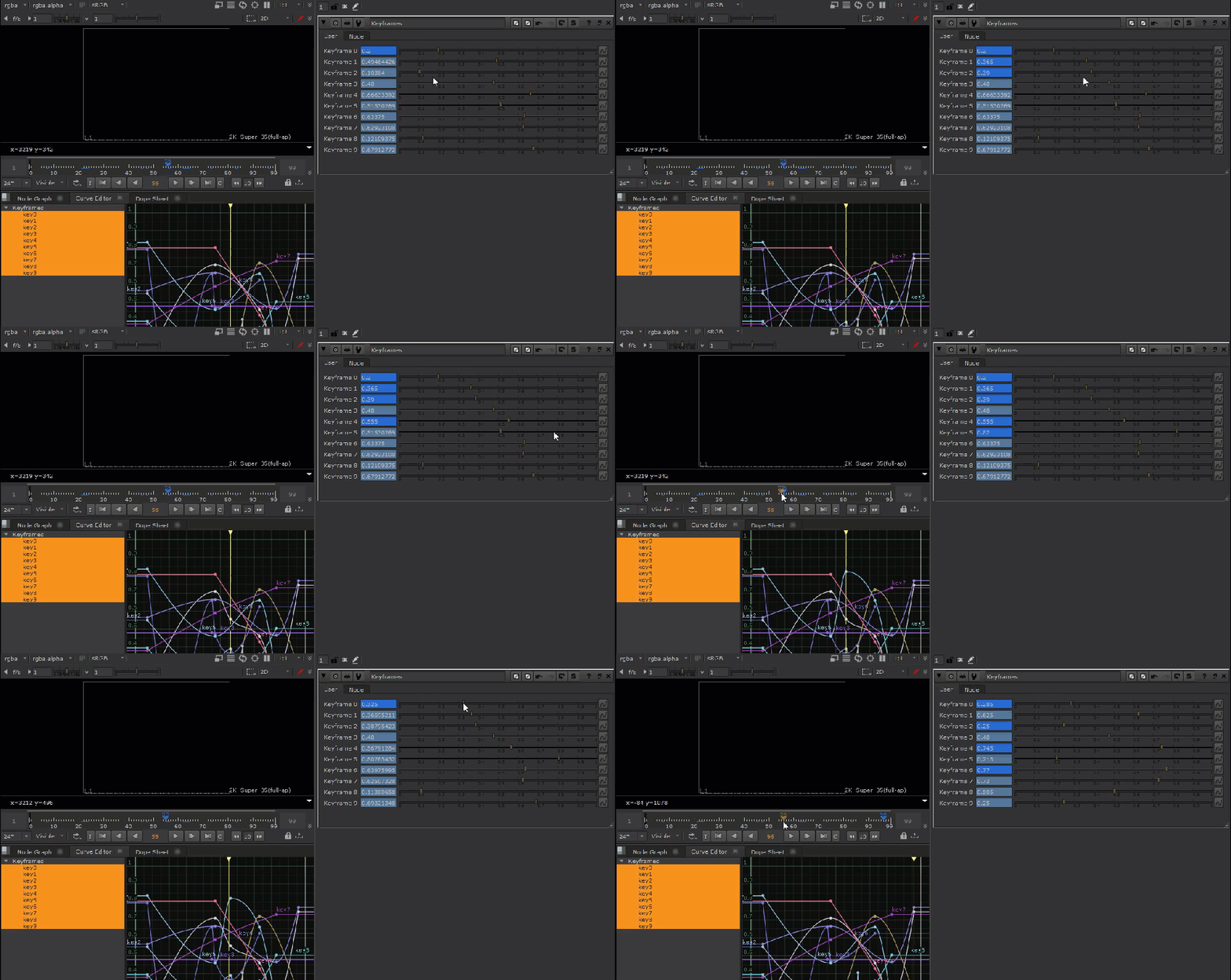
Setting keys on this thing was unpleasant, especially when it was required to change parameters each frame. You know, set this parameter to 1 at this frame, and set its neighboring frames to 0 to prevent interpolation.
Multiply this with 10 parameters and you quickly find yourself with a mess of keyframes that are difficult to change and extremely error prone as the keys are so interwoven.
I don’t know about you, but I also die a little inside when I’m doing this.
And because I am a lazy compositor, probably the laziest, I searched the internet for a better way.
And I found nothing.
However, my determination to be as lazy as possible was overwhelming.
So, how solve this problem without keyframes?
Expressions, of course!
I duplicated the master controller for each frame that needed adjustments and switched between them with this expression:
input1.input.label == frame
Like this:
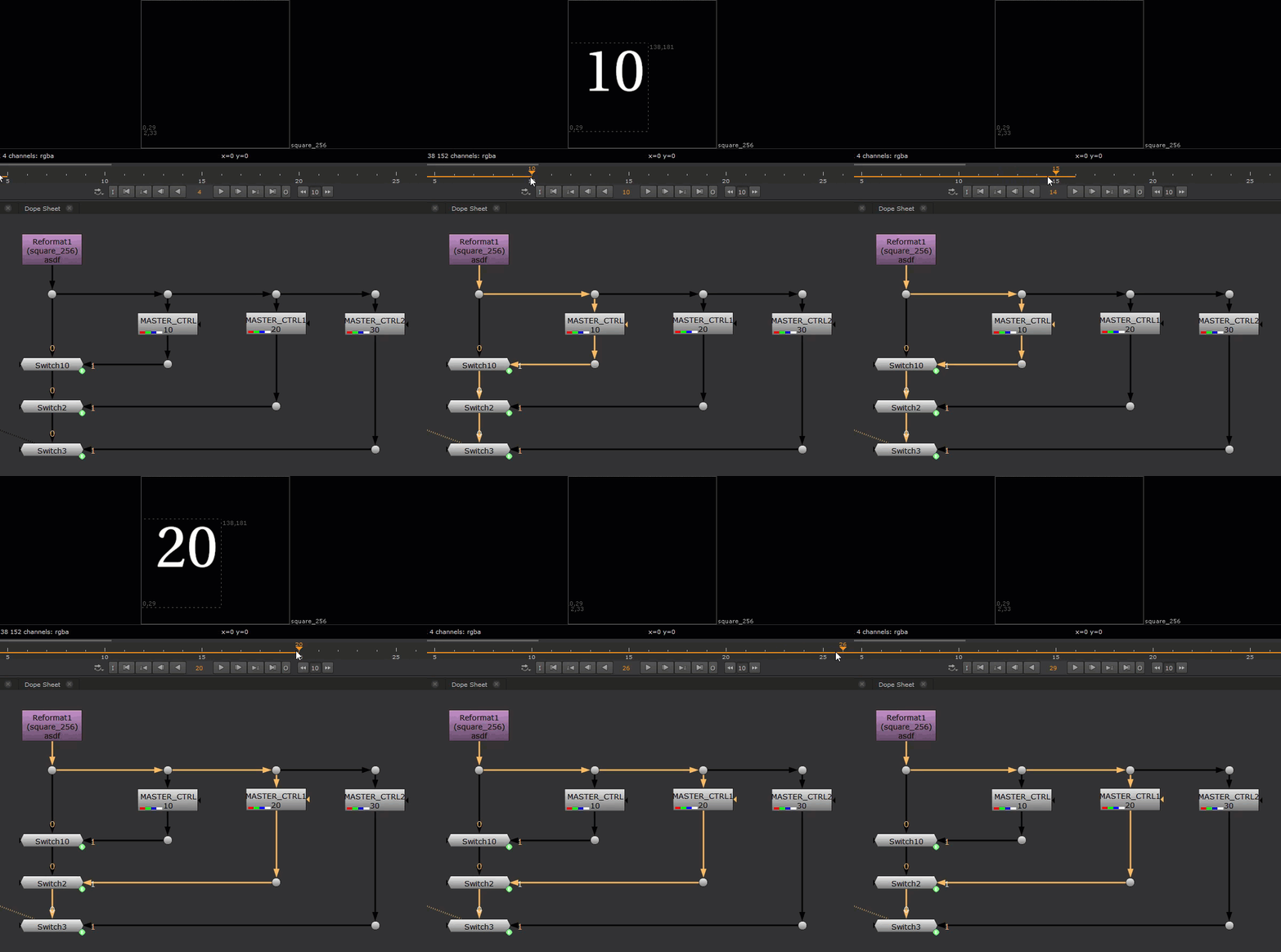
This expression first asks the switch nodes for their second inputs, which are the “MASTER_CTRL” nodes. Because computers are dumb like me and start counting at 0, so that’d be “input1” instead of “input0” ( Instead of using “input0”, we can just use “input” and Nuke is smart enough to figure out what we mean, but it doesn’t hurt to be specific! ).
Next, we’ll be placing a dot node in between each switch node and the “MASTER_CTRL” node, so let’s make sure our expression takes that extra node into consideration by adding “.input” to look one node further upstream. So now the expression looks like this:
input1.input
We now have arrived at the “MASTER_CTRL” nodes, and from here, we simply use a equivalence Binary Operator to test if the “MASTER_CTRL“‘s label is equal to the current frame.
input1.input.label == frame
If the label is equal to the frame, the switch will be set to 1.
If the label is not equal to the frame, the switch will be set to 0.
So now, for each frame I’d only have to copy and paste the switch and “MASTER_CTRL” nodes and hook up their inputs and change the label to the desired frame.

Which turned out to be way too much work for me …
I’m too lazy for this!
I needed a better way!
Then I thought about another technique I was using to turn on lens flares on specific frames.
It goes something like this:
On a switch node, we create a text input knob and named it “frames“.
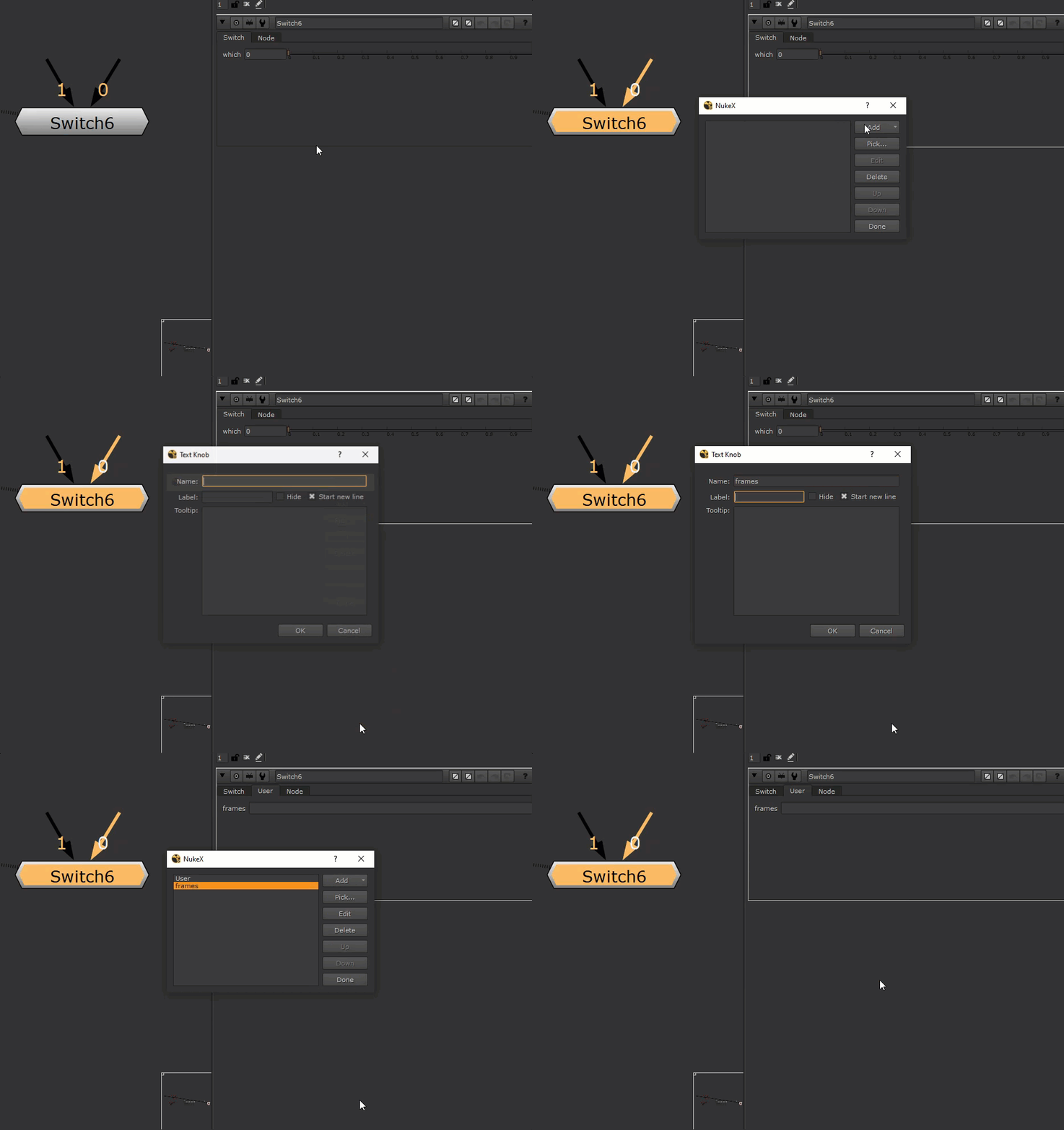
We’ll later enter frame numbers into this knob to drive our switch.
In the “which” knob, we write a Boolean expression with in Python:
str(nuke.frame()) in re.split(‘[^0-9]+’,nuke.thisNode()[‘frames’].getValue())

NOTE: This expression uses Python’s Regular Expression library, which might not be imported by default in your flavor of Nuke, so make sure to import it if you want to try this! Import it by typing in the script editor “import re” and hitting CTRL + ENTER.
Alright, let’s see what this Python snippet is doing.
First, it asks Nuke what frame we’re on with “nuke.frame()“. The result Nuke returns is an integer, which we’ll want to convert to text ( or string in computer talk ) to later compare with the values in “frames” text input knob. To do that, we call the Python’s convert to string function.
str(nuke.frame())
Next, we use regular expressions or ReGex, which is a way to search for specific patterns in text, to find all valid frame numbers in the “frames” knob.
To better illustrate what’s going on, let’s go ahead and put some frames in now.

Let’s break down the ReGex half of our initial expression:
re.split(‘[^0-9]+’,nuke.thisNode()[‘frames’].getValue())
First, we need to read the values in the “frames” knob on our switch node with:
nuke.thisNode()[‘frames’].getValue()
“nuke.thisNode()” tells Nuke that we want to operate on the current node itself, and “[‘frames’]” tells Nuke that we want to access the “frames” knob we created, and finally, what do we want to do with the “frames” knob? Well, we want to get its value of course, thus the “getValue()” command is called.
Cool, we now have the value of the “frames” knob, which is just a long string:
“1, 10, 20, 30, 40, 50”
What we want to do next is to compare each numerical value in the string with the current frame. We can’t do it with the string, we’d need to process it further to take out all the empty spaces, commas, and store the digits in a list!
To achieve this, we run the ReGex split command on our string:
re.split(‘[^0-9]+’ , nuke.thisNode()[‘frames’].getValue())
The re.split() function takes two parameters here, a search pattern (‘[^0-9]+’) and the string to perform the search on, and will split the string at any instance where it matched with the search pattern. In the end it will give us back a list with all the split out values.
The search pattern I used was:
‘[^0-9]+’
It looks cryptic yes, but it helps us to find any non-digit characters, and allows for repeating characters, which means we can use any separator character when typing out our frames.
The result a neat list:
[’10’, ’20’, ’30’, ’40’, ’50’]
Finally, we test to see if the current frame we got earlier is in this list:
str(nuke.frame()) in re.split(‘[^0-9]+’,nuke.thisNode()[‘frames’].getValue())
We can see the expression working now:
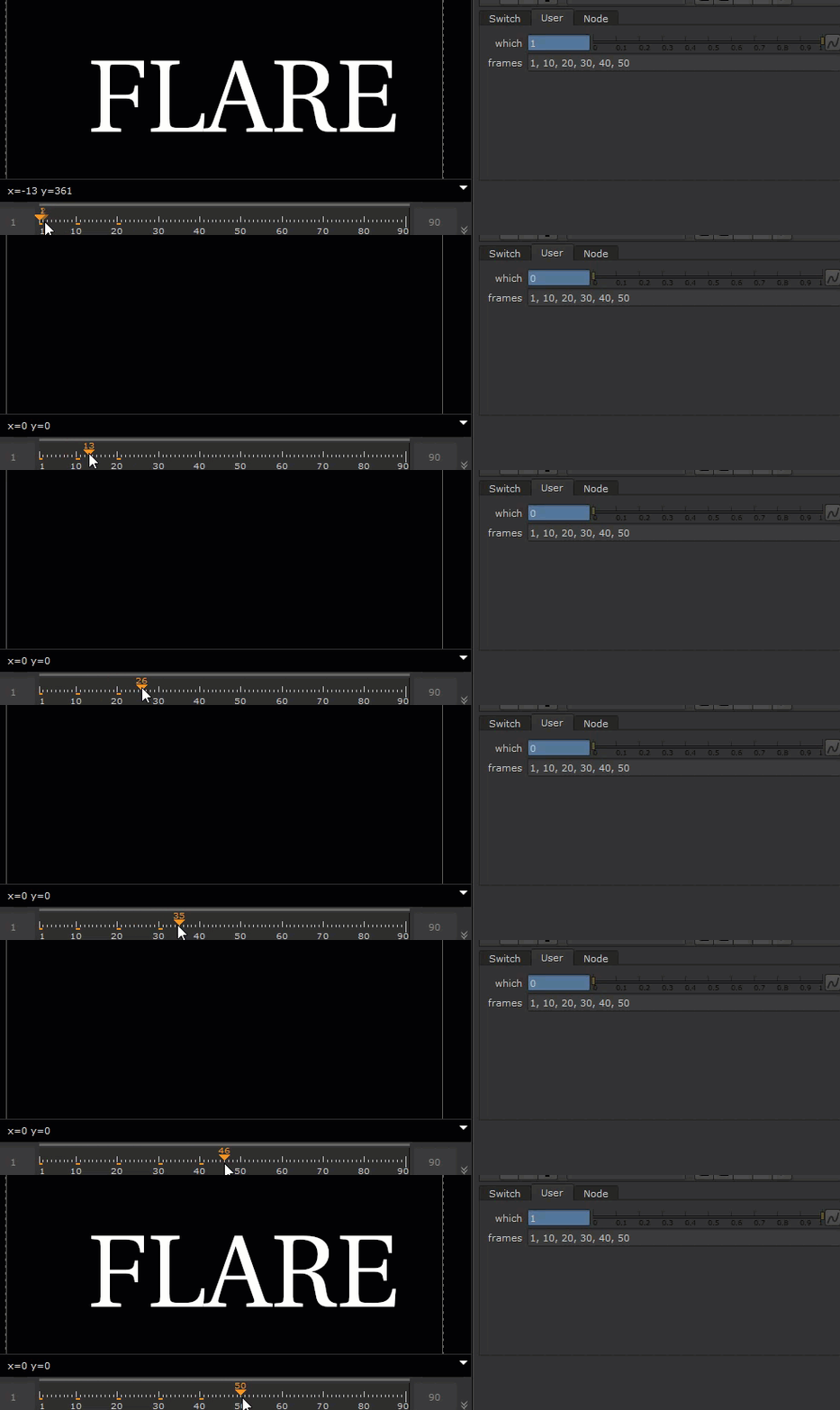
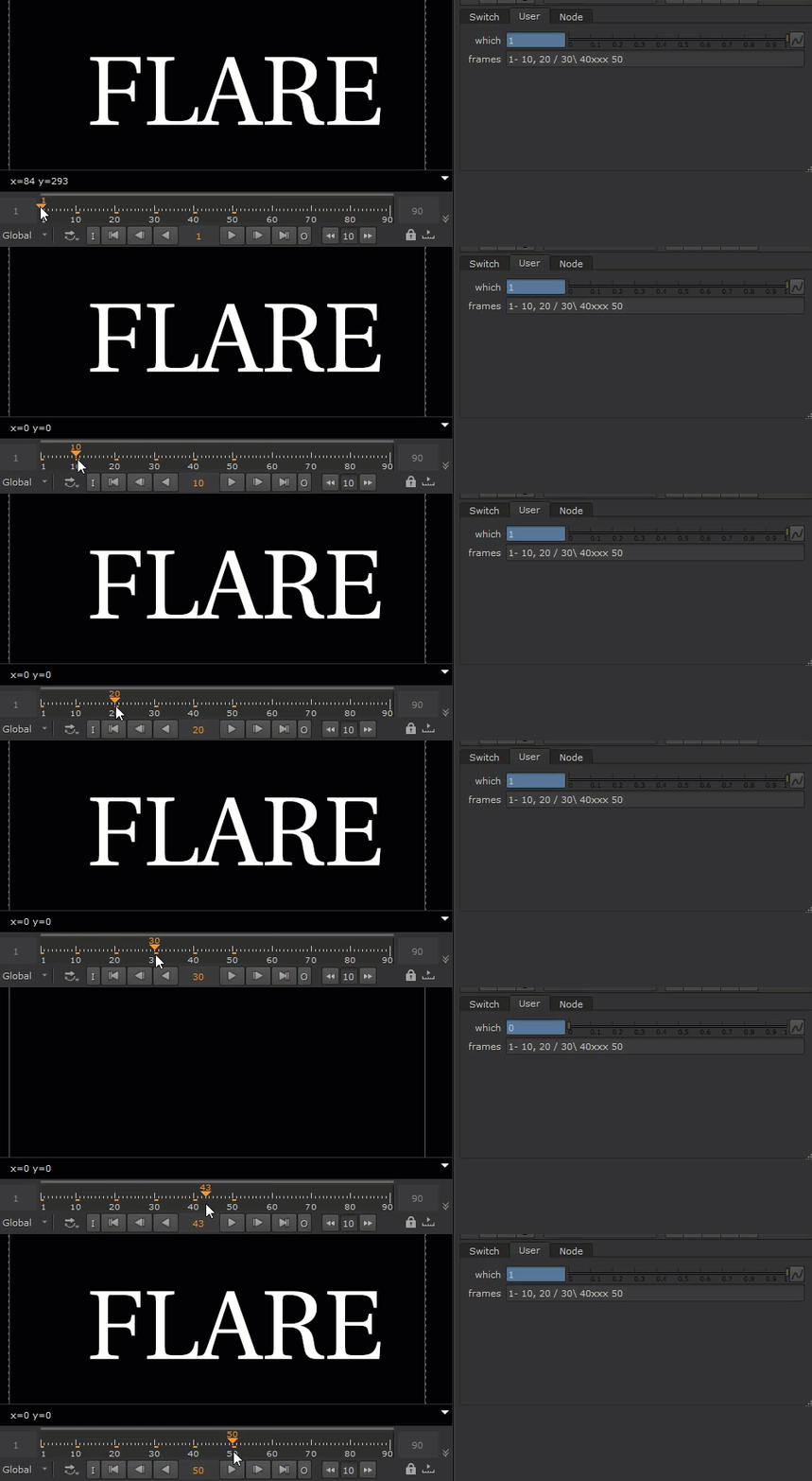
Ok, now that we saw what a little bit of Python can do, let’s see how I was able to come up with the laziest solution to my original problem.
This article is so long and boring that you probably forgot what the original problem was, so to remind you:
I AM TOO LAZY TO SET UP A SWITCH EACH TIME I WANT TO TOGGLE TO A DIFFERENT FRAME, SO I WANT ONE SWITCH TO DO ALL THE WORK!
Like this:
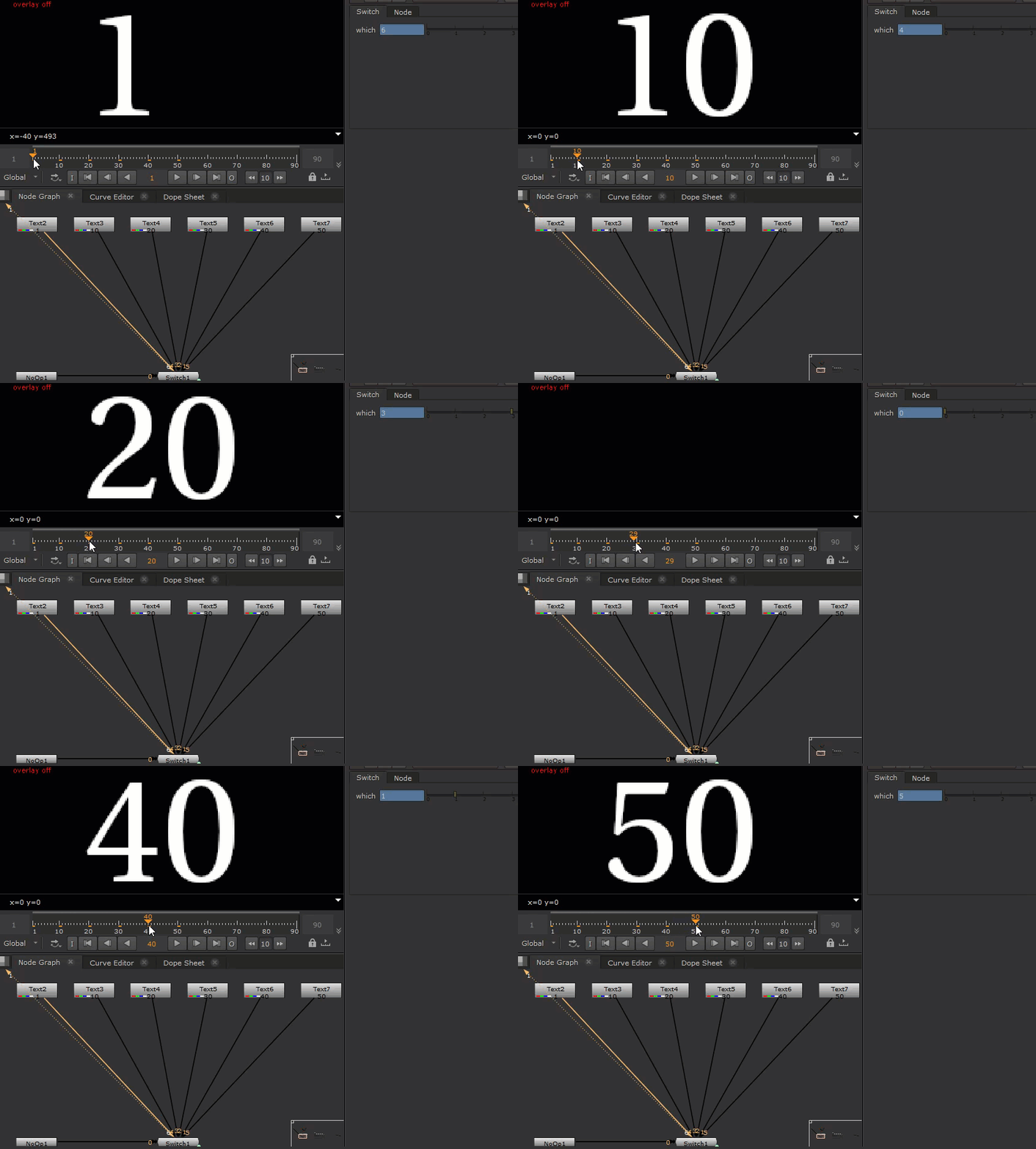
The design I came up was to have a switch that reads the label from its inputs and automatically switches to the appropriate input when the frame is the same as the label.
And here’s the code that did just that:
[nuke.thisNode().input(i)[‘label’].getValue() for i in range(nuke.thisNode().inputs())].index(str(nuke.frame()))
This is a bit more complicated and cryptic because we can’t achieve this result with a simple Boolean expression like the last example.
But I firmly believe the longer the expression the more lazy we get to be. And that’s a good thing!
Let’s unpack, starting with the first part:
[nuke.thisNode().input(i)[‘label’].getValue() for i in range(nuke.thisNode().inputs())]
This is called a list comprehension in Python is really just a for loop written in one line. It might help to read it like this:
[ doThis for eachItem in thisList ]
List comprehensions give us back a list of values.
With the knowledge we gathered from the previous examples, we can make a decent guess that this list comprehension is trying to create a list with all the labels for all the upstream nodes for the current node.
And the result in our example:
[”, ‘1’, ’10’, ’20’, ’30’, ’40’, ’50’]
You can see that the first value in the list is an empty string, and that’s because we’re using a NoOp as our first input. We can use this as a default input for the switch when there are no valid frames.
Let’s examine the second part of the code:
.index(str(nuke.frame()))
We can see that the current frame is being converted into a string, and then passed into the index() function which will find the first position where the value is the same as the frame number. This will return the correct result regardless of the order of inputs, which is what we want, because it’d be anti-lazy to have to reorder all upstream nodes whenever we insert or delete an existing input.
Testing our switch now shows that the which is updating to the correct input whenever the current frame is matched with the values in the list.

Correct input is guaranteed even with scrambled inputs, which maximizes our opportunity to be lazy!
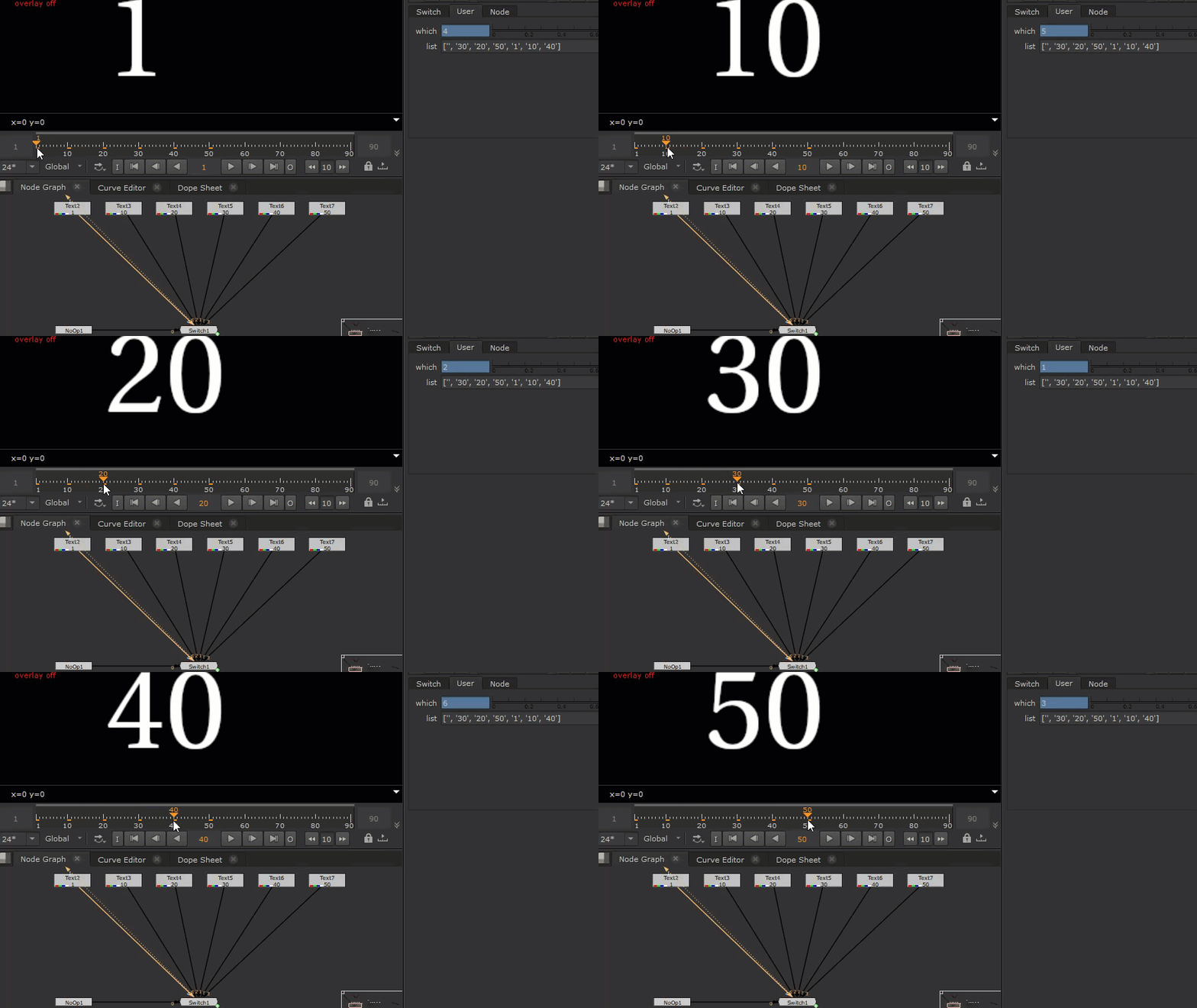
Adding new inputs is very easy, update the label to the desired frame, and the switch will do the rest!
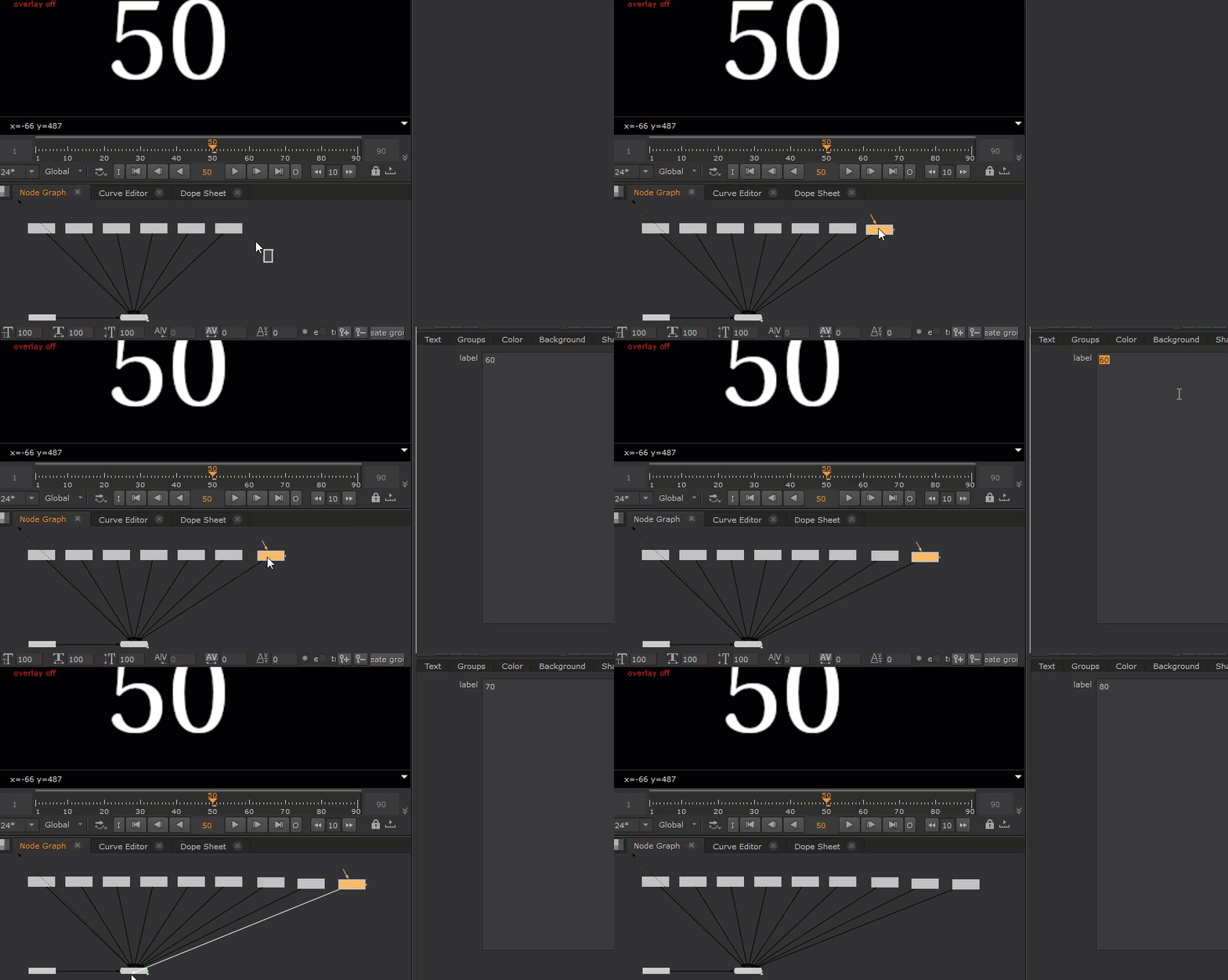
That’s it for this article, hopefully you’ve gotten some new ideas for procedural compositing, and ways of being as lazy possible!
Thank you for reading!
Nuke script of the examples if you’re interested:
set cut_paste_input [stack 0]
version 12.1 v2
BackdropNode {
 inputs 0
 name BackdropNode1
 tile_color 0x38aa50ff
 label "EXAMPLE 1\\nTCL BOOLEAN EXPRESSION"
 note_font_size 42
 selected true
 xpos -1902
 ypos 11
 bdwidth 1002
 bdheight 695
}
BackdropNode {
 inputs 0
 name BackdropNode2
 tile_color 0x388e8e00
 label "EXAMPLE 2\\nPYTHON BOOLEAN EXPRESSION\\nMIGHT NEED TO IMPORT REGEX FIRST!"
 note_font_size 42
 selected true
 xpos -782
 ypos 10
 bdwidth 859
 bdheight 679
}
BackdropNode {
 inputs 0
 name BackdropNode3
 tile_color 0xaa5c5cff
 label "EXAMPLE 3\\nPYTHON LIST COMPREHENSION"
 note_font_size 42
 selected true
 xpos 150
 ypos 10
 bdwidth 1356
 bdheight 676
}
push $cut_paste_input
Reformat {
 format "256 256 0 0 256 256 1 square_256"
 name Reformat1
 label asdf
 selected true
 xpos -1740
 ypos 185
 hide_input true
}
Dot {
 name Dot19
 selected true
 xpos -1706
 ypos 259
}
set N566b9400 [stack 0]
Dot {
 name Dot5
 selected true
 xpos -1553
 ypos 259
}
set N566b9000 [stack 0]
Dot {
 name Dot1
 selected true
 xpos -1409
 ypos 259
}
set N566b8c00 [stack 0]
Dot {
 name Dot2
 selected true
 xpos -1278
 ypos 259
}
set N566b8800 [stack 0]
Dot {
 name Dot3
 selected true
 xpos -1110
 ypos 259
}
Text2 {
 font_size_toolbar 100
 font_width_toolbar 100
 font_height_toolbar 100
 message "\[value label]"
 old_message {{51 48}
   }
 old_expression_markers {{0 1}
   }
 box {25.5 73.5 238.5 174.5}
 transforms {{0 2}
   }
 cursor_position 13
 center {1024 778}
 cursor_initialised true
 initial_cursor_position {{25.5 174.5}
   }
 group_animations {{0} imported: 0 selected: items: "root transform/"}
 animation_layers {{1 11 1024 778 0 0 1 1 0 0 0 0}
   }
 name MASTER_CTRL3
 label 30
 selected true
 xpos -1144
 ypos 290
}
Dot {
 name Dot4
 selected true
 xpos -1110
 ypos 566
}
push $N566b8800
Text2 {
 font_size_toolbar 100
 font_width_toolbar 100
 font_height_toolbar 100
 message "\[value label]"
 old_message {{51 48}
   }
 old_expression_markers {{0 1}
   }
 box {25.5 73.5 238.5 174.5}
 transforms {{0 2}
   }
 cursor_position 13
 center {1024 778}
 cursor_initialised true
 initial_cursor_position {{25.5 174.5}
   }
 group_animations {{0} imported: 0 selected: items: "root transform/"}
 animation_layers {{1 11 1024 778 0 0 1 1 0 0 0 0}
   }
 name MASTER_CTRL2
 label 30
 selected true
 xpos -1312
 ypos 290
}
Dot {
 name Dot7
 selected true
 xpos -1278
 ypos 465
}
push $N566b8c00
Text2 {
 font_size_toolbar 100
 font_width_toolbar 100
 font_height_toolbar 100
 message "\[value label]"
 old_message {{50 48}
   }
 old_expression_markers {{0 1}
   }
 box {25.5 73.5 238.5 174.5}
 transforms {{0 2}
   }
 cursor_position 13
 center {1024 778}
 cursor_initialised true
 initial_cursor_position {{25.5 174.5}
   }
 group_animations {{0} imported: 0 selected: items: "root transform/"}
 animation_layers {{1 11 1024 778 0 0 1 1 0 0 0 0}
   }
 name MASTER_CTRL1
 label 20
 selected true
 xpos -1443
 ypos 289
}
Dot {
 name Dot6
 selected true
 xpos -1409
 ypos 408
}
push $N566b9000
Text2 {
 font_size_toolbar 100
 font_width_toolbar 100
 font_height_toolbar 100
 message "\[value label]"
 old_message {{49 48}
   }
 old_expression_markers {{0 1}
   }
 box {25.5 73.5 238.5 174.5}
 transforms {{0 2}
   }
 cursor_position 13
 center {1024 778}
 cursor_initialised true
 initial_cursor_position {{25.5 174.5}
   }
 group_animations {{0} imported: 0 selected: items: "root transform/"}
 animation_layers {{1 11 1024 778 0 0 1 1 0 0 0 0}
   }
 name MASTER_CTRL
 label 10
 selected true
 xpos -1587
 ypos 290
}
Dot {
 name Dot18
 selected true
 xpos -1553
 ypos 352
}
push $N566b9400
Switch {
 inputs 2
 which {{"input1.input.label == frame"}}
 name Switch10
 selected true
 xpos -1740
 ypos 349
}
Switch {
 inputs 2
 which {{"input1.input.label == frame"}}
 name Switch2
 selected true
 xpos -1740
 ypos 405
}
Switch {
 inputs 2
 which {{"input1.input.label == frame"}}
 name Switch3
 selected true
 xpos -1740
 ypos 462
}
Switch {
 inputs 2
 which {{"input1.input.label == frame"}}
 name Switch4
 selected true
 xpos -1740
 ypos 563
}
Text2 {
 inputs 0
 font_size_toolbar 100
 font_width_toolbar 100
 font_height_toolbar 100
 message "\[value label]"
 old_message {{56 48}
   }
 old_expression_markers {{0 1}
   }
 box {0 411 107 512}
 transforms {{0 2}
   }
 cursor_position 13
 center {256 256}
 cursor_initialised true
 initial_cursor_position {{0 512}
   }
 group_animations {{0} imported: 0 selected: items: "root transform/"}
 animation_layers {{1 11 256 256 0 0 1 1 0 0 0 0}
   }
 name Text10
 label 80
 selected true
 xpos 1313
 ypos 247
 hide_input true
}
Text2 {
 inputs 0
 font_size_toolbar 100
 font_width_toolbar 100
 font_height_toolbar 100
 message "\[value label]"
 old_message {{55 48}
   }
 old_expression_markers {{0 1}
   }
 box {0 411 107 512}
 transforms {{0 2}
   }
 cursor_position 13
 center {256 256}
 cursor_initialised true
 initial_cursor_position {{0 512}
   }
 group_animations {{0} imported: 0 selected: items: "root transform/"}
 animation_layers {{1 11 256 256 0 0 1 1 0 0 0 0}
   }
 name Text9
 label 70
 selected true
 xpos 1193
 ypos 245
 hide_input true
}
Text2 {
 inputs 0
 font_size_toolbar 100
 font_width_toolbar 100
 font_height_toolbar 100
 message "\[value label]"
 old_message {{54 48}
   }
 old_expression_markers {{0 1}
   }
 box {0 411 107 512}
 transforms {{0 2}
   }
 cursor_position 13
 center {256 256}
 cursor_initialised true
 initial_cursor_position {{0 512}
   }
 group_animations {{0} imported: 0 selected: items: "root transform/"}
 animation_layers {{1 11 256 256 0 0 1 1 0 0 0 0}
   }
 name Text8
 label 60
 selected true
 xpos 1075
 ypos 241
 hide_input true
}
Text2 {
 inputs 0
 font_size_toolbar 100
 font_width_toolbar 100
 font_height_toolbar 100
 message "\[value label]"
 old_message {{52 48}
   }
 old_expression_markers {{0 1}
   }
 box {0 411 107 512}
 transforms {{0 2}
   }
 cursor_position 13
 center {256 256}
 cursor_initialised true
 initial_cursor_position {{0 512}
   }
 group_animations {{0} imported: 0 selected: items: "root transform/"}
 animation_layers {{1 11 256 256 0 0 1 1 0 0 0 0}
   }
 name Text6
 label 40
 selected true
 xpos 841
 ypos 238
 hide_input true
}
Text2 {
 inputs 0
 font_size_toolbar 100
 font_width_toolbar 100
 font_height_toolbar 100
 message "\[value label]"
 old_message {{49 48}
   }
 old_expression_markers {{0 1}
   }
 box {0 411 107 512}
 transforms {{0 2}
   }
 cursor_position 13
 center {256 256}
 cursor_initialised true
 initial_cursor_position {{0 512}
   }
 group_animations {{0} imported: 0 selected: items: "root transform/"}
 animation_layers {{1 11 256 256 0 0 1 1 0 0 0 0}
   }
 name Text3
 label 10
 selected true
 xpos 511
 ypos 238
 hide_input true
}
Text2 {
 inputs 0
 font_size_toolbar 100
 font_width_toolbar 100
 font_height_toolbar 100
 message "\[value label]"
 old_message {{49}
   }
 old_expression_markers {{0 0}
   }
 box {0 411 54 512}
 transforms {{0 2}
   }
 cursor_position 13
 center {256 256}
 cursor_initialised true
 initial_cursor_position {{0 512}
   }
 group_animations {{0} imported: 0 selected: items: "root transform/"}
 animation_layers {{1 11 256 256 0 0 1 1 0 0 0 0}
   }
 name Text2
 label 1
 selected true
 xpos 401
 ypos 238
 hide_input true
}
Text2 {
 inputs 0
 font_size_toolbar 100
 font_width_toolbar 100
 font_height_toolbar 100
 message "\[value label]"
 old_message {{53 48}
   }
 old_expression_markers {{0 1}
   }
 box {0 411 107 512}
 transforms {{0 2}
   }
 cursor_position 13
 center {256 256}
 cursor_initialised true
 initial_cursor_position {{0 512}
   }
 group_animations {{0} imported: 0 selected: items: "root transform/"}
 animation_layers {{1 11 256 256 0 0 1 1 0 0 0 0}
   }
 name Text7
 label 50
 selected true
 xpos 951
 ypos 238
 hide_input true
}
Text2 {
 inputs 0
 font_size_toolbar 100
 font_width_toolbar 100
 font_height_toolbar 100
 message "\[value label]"
 old_message {{50 48}
   }
 old_expression_markers {{0 1}
   }
 box {0 411 107 512}
 transforms {{0 2}
   }
 cursor_position 13
 center {256 256}
 cursor_initialised true
 initial_cursor_position {{0 512}
   }
 group_animations {{0} imported: 0 selected: items: "root transform/"}
 animation_layers {{1 11 256 256 0 0 1 1 0 0 0 0}
   }
 name Text4
 label 20
 selected true
 xpos 621
 ypos 238
 hide_input true
}
Text2 {
 inputs 0
 font_size_toolbar 100
 font_width_toolbar 100
 font_height_toolbar 100
 message "\[value label]"
 old_message {{51 48}
   }
 old_expression_markers {{0 1}
   }
 box {0 411 107 512}
 transforms {{0 2}
   }
 cursor_position 13
 center {256 256}
 cursor_initialised true
 initial_cursor_position {{0 512}
   }
 group_animations {{0} imported: 0 selected: items: "root transform/"}
 animation_layers {{1 11 256 256 0 0 1 1 0 0 0 0}
   }
 name Text5
 label 30
 selected true
 xpos 731
 ypos 238
 hide_input true
}
NoOp {
 inputs 0
 name NoOp1
 selected true
 xpos 404
 ypos 507
 hide_input true
}
Switch {
 inputs 10
 which {{"\[python \\\[nuke.thisNode().input(i)\\\['label'\\].getValue()\\ for\\ i\\ in\\ range(nuke.thisNode().inputs())\\].index(str(nuke.frame()))]"}}
 name Switch1
 selected true
 xpos 673
 ypos 507
}
Reformat {
 inputs 0
 format "512 512 0 0 512 512 1 square_512"
 name Reformat2
 selected true
 xpos -454
 ypos 248
 hide_input true
}
Text2 {
 font_size_toolbar 120
 font_width_toolbar 100
 font_height_toolbar 100
 message FLARE
 old_message {{70 76 65 82 69}
   }
 box {95 183.5 461 304.5}
 transforms {{0 2}
   }
 font_size_values {{0 120 1 120 2 120 3 120 4 120 0 110 1 110 2 110 3 110 4 110}
   }
 cursor_position 3
 font_size 120
 center {1024 778}
 cursor_initialised true
 initial_cursor_position {{95 304.5}
   }
 group_animations {{0} imported: 0 selected: items: "root transform/"}
 animation_layers {{1 11 1024 778 0 0 1 1 0 0 0 0}
   }
 name Text1
 selected true
 xpos -454
 ypos 283
}
Crop {
 box {0 0 512 512}
 name Crop1
 selected true
 xpos -454
 ypos 322
}
push 0
Switch {
 inputs 2
 which {{"\[python str(nuke.frame())\\ in\\ re.split('\\\[^0-9\\]+',nuke.thisNode()\\\['frames'\\].getValue())]"}}
 name Switch6
 selected true
 xpos -454
 ypos 539
 addUserKnob {20 User}
 addUserKnob {1 frames}
 frames "10, 20, 30, 40, 50, 60"
}
Viewer {
 frame 10
 frame_range 1-90
 name Viewer1
 selected true
 xpos 672
 ypos 612
}
NoOp {
 inputs 0
 name IMPORT_REGEX_HERE
 selected true
 xpos -683
 ypos 245
 hide_input true
 addUserKnob {20 User}
 addUserKnob {22 importRe l "Import ReGex" T "import re" +STARTLINE}
}
 input + output