Vancouver’s got some heavy snow fall in recent days, which forced me to abandon my bicycle and “switch” to the Skytrain to get me to work.
I rewrote the first paragraph no less than 10 times. I’m a master of word play.

The Switch node needs no introduction, no node tree is complete with a few of these sprinkled in. It does its job well, without complaint, and rarely is the culprit for corrupting a script.
Which kind of makes it … bland.

And throughout my time working with it, I’ve always looked for ways to make it more dynamic, powerful, and less boring.
In comes the Binary Operators!
What are Binary Operators?
Binary operators differ from programming language to language. In Nuke, the binary operators are based on C.

A common use I have for the switch node is to animate on and off muzzle flashes. I used to manually set keys across 3 frames to have it animate on and off. And when I get a note, I’d open my dope sheet to slide the keys back and forth, which leaves a lot of room for human error.
It all changed when I discovered the binary operators, which allowed me to programatically control the switch node.
Take the muzzle flash scenario above, if we want the muzzle flash to turn on on frame 10, we can enter this expression on the switch node:
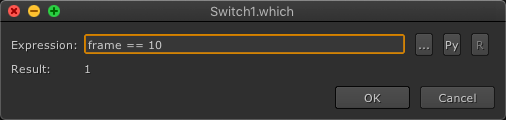
Albeit a simplistic example, this in my opinion is a much better approach than manually setting keyframes.
And as I write more articles, you will begin to notice a returning theme of my distaste for keyframes.
We can easily expand this to include more than one specific frame:
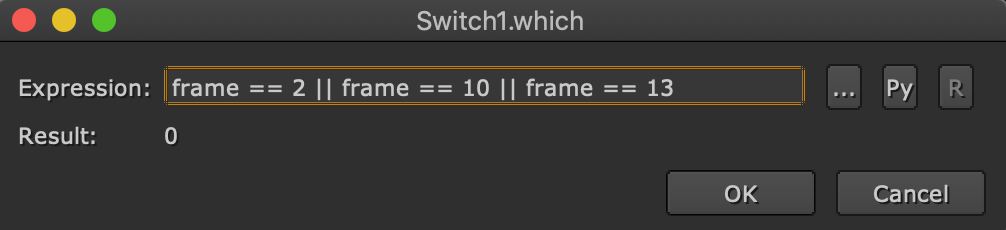
The new expression we entered will turn on the muzzle flash at frames 2, 10 and 13.
Onto a new problem.
What if we wanted a light to turn on for multiple frames, say for the frames between 3 and 10?
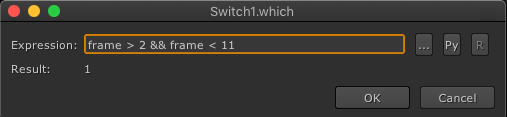
The expression we entered means this:
“If frame is greater than 2 and frame is less than 11, return True.”
In programming, 1 equals True, while 0 equals False. So in this instance, while the condition is true, the switch will be set to 1.
And also it’s pretty easy to invert this:
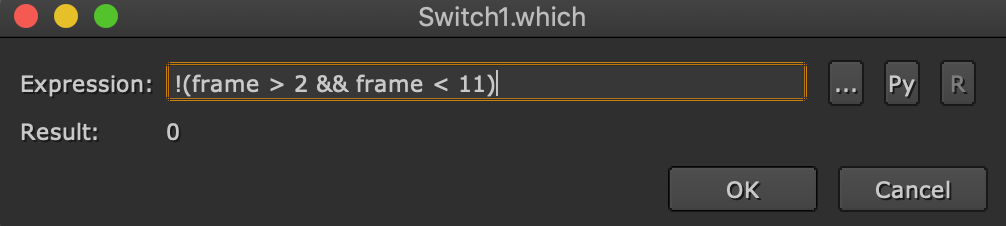
And that wraps up this short introduction to the binary operators we can use in Nuke to power up our switch node!
Hopefully I’ve helped you discover some new found knowledge!
There’re many operators out there for us to play with, and they all have their own special uses, and I will expand on them with real world examples in later posts.
Aside from using binary operators, there’s another type of operator called the Ternary Operator, which enables us to build more complex logic for the switch node (and any node really!) for tool building. Many of you might have already been unknowingly utilizing this in the form of “$gui?1:0“. I plan to write about that as well to share how I set up some cool automated tools for everyday compositing.
And of course, there’s the ability to write Python directly into the switch node, and that’s a whole other topic onto itself!
The following is not a paid ad placement. It is something I’ve been sharing with my coworkers on my own accord and now I’m sharing it with you!
For a nice and easy introductory primer for Python in Nuke, check out Python For Nuke 101 taught by Ben McEwan, I have definitely picked up a few tricks from his course! Ben also runs a news letter specifically for Nuke artists that I’ve been a subscriber to for a long time, and I encourage you to sign up too! Not only will you learn many tips and tricks, more importantly, you’ll get to see what other amazing artists are making with Nuke that’ll inspire to push yourself further as well!
PS. For a limited time Ben’s sharing the first few lessons for free! Check them out before he takes them off the shelves!
 input + output