
With the recent release of Nuke 12 and Houdini 18, I got the idea to begin a series of ten short articles to help to “version up” the skill-sets of my fellow compositors, through the sharing of some tips and tricks I’ve collected over the years in the trenches.
Depending on your level of expertise, your mileage may vary.
To kick things off:
INVERSION
Inversion is something we do in compositing all the time, either by using the ‘Invert’ node to invert color data, or using the invert functions on Transform nodes to invert matrices, etc..
This article aims to clarify the inversion of values, not matrices.
Let’s use a real world example :
A shot needs projection work done, but the element isn’t big enough to cover the shot. With the reformat node, the artist scales up their input to 1.15 using ‘None’ as resize type, paints extensions, and duplicates the reformat node and uses the inverse value of 0.85, then checks against the original input and notices it’s doesn’t match anymore.

Frustrated, the artist drops down a ‘Transform’ node and manually matches the result back to the original.
Why did the ‘Reformat’ node not do what the artist pictured it’d do?
Let’s check the math:
We started with the value 1, and incremented to 1.15, by logic, to get back to where we started, we’d only have to increment the other way to 0.85.
Here’s the logic plotted out on a line:

Everything seems to check out. So why aren’t we getting the expected result?
It turns out that there are two inverse values for each value:
- Additive Inverse Value, where the value and its inverse adds up to zero.
- Example: 5 + (-5) = 0
- Multiplicative Inverse Value / Reciprocal Value, where the value and its inverse multiplies to 1.
- Example: 5 * (1/5) = 1
The artist in this case has mistakenly thought the reformat scaling operation was done additively, with addition and subtraction, where in fact it is done multiplicatively, with multiplication and division.
The correct logic in this case is to calculate 1/1.15 to get the inverse value which yields to 0.8695….
The correct result plotted on the graph:
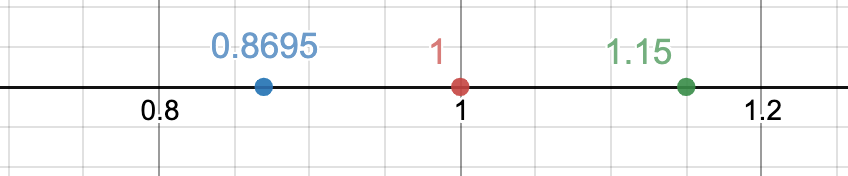
And we now have a happy compositor!

Knowing when to use the correct inversion formula will not only help us in our daily compositing tasks, it can also gives us a lot of creative and automatic control when building templates and tools for the team.
 input + output